Worldwide public cloud spending is projected to hit $723.4 billion in 2025, a jump of 21.5% from the year before, according to Gartner's forecast. That growth curve hasn't slowed heading into 2026.
Here's the real problem for growing businesses: most don't have a dedicated FinOps team or procurement function. So when the bill spikes, they either overspend out of confusion or take cost-cutting advice from the same vendor that's profiting from their spend.
This guide breaks down the top provider-agnostic strategies working in 2026, how to pick the right combination for your business, the mistakes that quietly drain budgets, and where independent guidance actually moves the needle.
Key Takeaways
- Cloud cost optimization works best as an ongoing practice, not a one-time cleanup project
- AI and GPU workloads now demand dedicated cost tactics beyond traditional rightsizing
- Commitment discounts only pay off once usage patterns are well understood
- Tagging and governance are prerequisites, not optional add-ons, for every other strategy
- Vendor-neutral benchmarking helps SMBs avoid biased advice from a single provider
Cloud Cost Optimization in the 2026 Technology Landscape
Cloud cost optimization is the ongoing process of matching what you pay for infrastructure to what your workloads actually use, without sacrificing performance or reliability.
That definition matters more in 2026 than it did five years ago. Multi-cloud environments are now standard for mid-market companies, and AI-heavy workloads add a layer of cost complexity most in-house teams have never dealt with before.
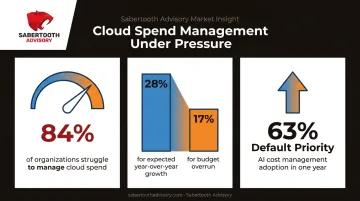
The pressure shows up clearly in recent industry data:
- 84% of organizations say they struggle to manage cloud spend effectively, per Flexera's 2025 research
- Expected cloud spend growth sits at 28% year over year, while budgets already run 17% over projections (same Flexera report)
- AI cost management moved from a 63% adoption concern to a default FinOps priority in a single year
Quarterly usage checks no longer keep spend in line. The strategies below are what mid-market teams use to control cloud costs without a dedicated FinOps staff.
Top Cloud Cost Optimization Strategies for 2026
We selected these strategies using four criteria:
- Measurable return on investment
- Ease of implementation without specialized tooling
- Applicability across AWS, Azure, and GCP
- Relevance to 2026-specific trends like AI and GPU cost escalation
Rightsize Compute and Storage Resources
Over-provisioning remains one of the largest sources of cloud waste. Teams size instances for peak demand and never revisit that decision, even after usage patterns change.
The 2026 twist: workloads shift. A memory-optimized instance provisioned for a data-heavy job last year might now be running compute-heavy tasks it was never sized for. One-time reviews miss this drift entirely.
| Category | Detail |
|---|---|
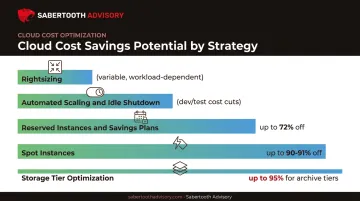
| Typical Savings Potential | Varies by fleet; native tools like AWS Compute Optimizer and Azure Advisor generate resource-specific estimates rather than a flat percentage |
| Best Suited For | Predictable, steady-state workloads and legacy lift-and-shift applications |
| Implementation Tip | Review utilization data monthly and pair rightsizing with autoscaling, not a static resize |
Automate Scaling and Shut Down Idle Resources
Autoscaling and scheduled shutdowns stop you from paying for capacity nobody's using, especially overnight or on weekends in non-production environments.
Self-service provisioning made this problem worse, not better. When any engineer can spin up a dev environment with a few clicks, idle sprawl multiplies fast without governance in place.
| Category | Detail |
|---|---|
| Typical Savings Potential | Meaningful reductions in dev/test spend; exact figures depend on how many hours resources sit idle |
| Best Suited For | Non-production, development, and staging environments |
| Implementation Tip | Tag resources by owner so unused instances can be identified and safely terminated |
Use Reserved Instances and Savings Plans
Committing to a usage baseline in exchange for a discount works well, but only for workloads with predictable, steady-state demand. Guess wrong, and you're locked into paying for capacity you don't use.
Over-committing before usage patterns are understood is one of the most expensive mistakes teams make. It happens when someone sees a discount ceiling and commits without validating actual, sustained usage first.
| Category | Detail |
|---|---|
| Typical Savings Potential | Up to 72% off On-Demand pricing for AWS Standard RIs and Azure Reserved VMs; up to 55-70% for GCP committed-use discounts, depending on resource type and term |
| Best Suited For | Stable, mission-critical workloads with consistent baseline usage |
| Implementation Tip | Commit only to baseline capacity and cover variable demand with on-demand or spot pricing |
Use Spot Instances and Preemptible VMs
Spot and preemptible capacity offer steep discounts because providers sell it as leftover, interruptible capacity. It's ideal for workloads that can tolerate a sudden shutdown.
In 2026, the highest-impact use case is GPU-backed spot capacity for AI and ML training. AWS EC2 Spot Instances offer savings of up to 90% compared to On-Demand pricing. That only works if you've built checkpointing into your training jobs so interruptions don't cost you hours of progress.
| Category | Detail |
|---|---|
| Typical Savings Potential | Up to 90% (AWS, Azure) and up to 91% (GCP), including many GPU and TPU instance types |
| Best Suited For | Batch processing, CI/CD pipelines, and fault-tolerant ML training jobs |
| Implementation Tip | Use orchestration tools that auto-migrate workloads when instances get interrupted |
Optimize Storage Tiers and Data Lifecycle
Storage costs creep up quietly. Data sits in premium tiers long after anyone accesses it, and lifecycle policies that should move it to cheaper storage simply don't exist.
AI pipelines and vector databases are accelerating this problem. Training datasets, embeddings, and model checkpoints pile up faster than traditional application data ever did.
| Category | Detail |
|---|---|
| Typical Savings Potential | Up to 40% moving to Infrequent Access after 30 days, and up to 95% for Deep Archive tiers after 180 days (AWS S3 Intelligent-Tiering) |
| Best Suited For | Infrequently accessed data, logs, backups, and completed AI/ML datasets |
| Implementation Tip | Automate lifecycle policies that shift aging data to cheaper tiers and delete orphaned volumes |
Strengthen Cost Visibility, Tagging, and FinOps Governance
You can't optimize what you can't attribute. Visibility and consistent tagging are the prerequisite for every strategy above, not an optional extra step.
The FinOps Foundation's maturity model frames this as crawl, walk, run progression. Crawl means basic KPIs with minimal tooling. Walk brings broader organizational adoption. Run means automation is preferred across teams. Allocation accuracy improves at each stage.
| Category | Detail |
|---|---|
| Typical Savings Potential | Indirect, but significant; better allocation drives accountability that compounds across every other tactic |
| Best Suited For | Any organization with multiple teams, products, or cost centers sharing infrastructure |
| Implementation Tip | Automate tag enforcement rather than relying on manual tagging discipline |
Control Data Transfer and Egress Costs
Cross-region and egress charges add up fast, especially in multi-cloud setups where services in different regions or providers are constantly talking to each other.
Keeping related services co-located and routing traffic through a CDN cuts down on transfer charges that most teams never think to architect around.
| Category | Detail |
|---|---|
| Typical Savings Potential | Depends heavily on architecture; avoidable cross-region calls are the main lever |
| Best Suited For | Multi-region and multi-cloud architectures with heavy internal data movement |
| Implementation Tip | Audit your architecture for avoidable cross-region calls before adding compute elsewhere |
Optimize AI/ML and GPU Workload Costs
AI has become one of the fastest-moving cost categories cloud teams are tracking. FinOps adoption of AI spend management reached 98% of surveyed organizations in 2026, up from 63% just a year earlier, according to the FinOps Foundation's State of FinOps 2026 report. Traditional rightsizing alone doesn't solve GPU-specific waste.
Practical tactics that work:
- Use lower-cost GPU types for development and experimentation
- Reserve premium GPUs for production inference and training only
- Auto-shut down idle notebooks and stalled training jobs
| Category | Detail |
|---|---|
| Typical Savings Potential | Achievable through GPU rightsizing and spot usage for training; GCP Spot ceilings reach up to 91% for many GPU types |
| Best Suited For | Organizations running LLM inference, model training, or vector database workloads |
| Implementation Tip | Track cost-per-inference and cost-per-training-run as ongoing KPIs, not one-time metrics |
How to Choose the Right Strategy for Your Business
The biggest mistake we see is businesses chasing discounts before they've built visibility. They commit to reserved capacity based on a gut feeling about usage, then get stuck paying for a baseline that doesn't match reality six months later.
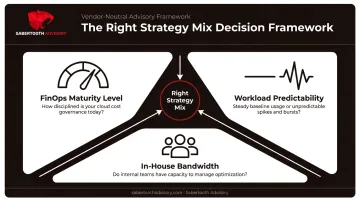
A better approach weighs three factors:
- Your FinOps maturity level. If you're still figuring out where spend is going, prioritize visibility tools before touching commitment discounts. Advanced automation only pays off once foundational tracking exists.
- Workload predictability. Steady-state workloads favor reserved instances and savings plans. Variable, bursty workloads favor autoscaling and spot capacity instead.
- Honest assessment of in-house bandwidth. Most SMB and mid-market teams don't have staff dedicated to evaluating cloud providers and cost tools objectively. That's not a knock on them—it's a resourcing reality.
This is where an outside, vendor-neutral perspective earns its keep. Sabertooth Advisory's Technology Assessments and Vendor Benchmarking services give businesses without dedicated procurement teams an apples-to-apples way to evaluate cloud providers and cost tools before committing budget.
The process:
- Defines weighted criteria upfront
- Scores every shortlisted vendor against identical questions
- Normalizes pricing to a 3-year total cost of ownership so hidden escalators don't skew the decision later
Common Cloud Cost Optimization Mistakes to Avoid
Even well-intentioned teams fall into the same traps repeatedly:
- Treating optimization as a one-time cleanup. Workloads shift and pricing models change. A review from last year is already stale.
- Over-committing to reserved instances too early. Locking in a 1–3 year discount before usage patterns stabilize often costs more than it saves.
- Weak tagging and unclear cost ownership. Total-spend views hide waste. Break costs down by customer, product, or transaction—or you can’t tell what to cut.
- Leaving idle and orphaned resources running. Unattached volumes, forgotten sandboxes, and oversized always-on instances burn budget every month with no business return.
Making Cloud Cost Optimization Sustainable
The right combination of strategies depends on your workload mix, your team's bandwidth, and how mature your cost governance already is, not on which discount looks biggest on paper.
Reassess your architecture, governance, and vendor mix regularly. Treating this as a set-and-forget decision is exactly how businesses end up back where they started in twelve months.
If you want an independent view of where your cloud spend stands, Sabertooth Advisory offers a no-cost technology assessment that benchmarks your infrastructure and suppliers.
Call +1 (888) 891-2331 or visit contact Sabertooth Advisory to get started.
Frequently Asked Questions
Is AWS cost optimization free?
AWS provides free native tools like Cost Explorer and Budgets for basic visibility. Advanced allocation, unit economics, or multi-cloud optimization typically requires paid third-party platforms or advisory support.
What are the most effective cloud cost optimization strategies?
Rightsizing, automation and autoscaling, commitment discounts, and strong tagging and governance deliver the largest savings. Used together, they produce the most sustainable results across organizations.
What are the pillars of cloud cost optimization?
The core pillars are visibility and allocation, rate optimization through discounts and commitments, usage optimization through rightsizing and automation, and governance that ties spend to business value.
How much can businesses realistically save through cloud cost optimization in 2026?
Most organizations reclaim about 20–40% of cloud spend after rightsizing, commitments, and governance are in place. AI and GPU workloads often yield the largest gains because that spend is high and frequently under-optimized.
Do small and mid-sized businesses need a dedicated FinOps team?
A full FinOps team helps at scale, but SMBs can start with foundational practices and lean on independent advisors for objective, vendor-neutral guidance instead of hiring in-house.
How often should cloud costs be reviewed?
Pair continuous monitoring and anomaly alerts with monthly structured reviews and deeper quarterly audits, especially after any architecture changes.